Unplug Toaster After Use: A Practical Safety Guide
Learn why unplugging a toaster after use matters for safety, energy efficiency, and appliance longevity. This guide covers when to unplug, safe handling, cleaning, and storage tips for homeowners and kitchen enthusiasts.


This guide shows how to unplug a toaster after use safely, minimize fire risk, and protect outlets. You'll learn when to unplug, how to handle hot surfaces, and how to store the appliance. Follow simple, step-by-step actions for a quick, risk-free routine. This is especially important for households with pets or children. Proper unplugging habits save energy and prolong outlet life.
Why unplugging after use matters
Unplugging after use is a simple, powerful safety habit. According to ToasterInsight, unplug toaster after use to minimize fire risk, reduce heat transfer to outlets, and prevent the toaster from drawing standby current. When a toaster is left plugged in after a bake cycle, residual heat from the coils can linger near the plastic housing and nearby utensils. In some cases crumbs can accumulate inside the crumb tray and ladder toward the outlet area if the device is bumped. The electrical path remains live as long as the plug is inserted, so small surges or accidental contact might ignite crumbs or overheated contacts. By unplugging, you remove the electricity pathway entirely, which greatly reduces risk for households with curious children or curious pets that like to explore on the counter. It also keeps your kitchen calmer during fast-paced mornings. In practice, the habit is quick and straightforward: switch to off, then grasp the plug and pull it straight out. The payoff is safety, confidence, and fewer post-use worries.
When to unplug and what to check before unplugging
The safest rule is to unplug after every use, once the toaster has cooled enough to touch safely. Before unplugging, perform a quick tactile check: the exterior should feel cool, the metal prongs should not be numb to touch, and the crumb tray should be closed and intact. If you have a model with a reheat or stay-warm setting, make sure the lever has returned to the normal position and the dial is off. If the toaster is on a surge-prone power strip or an overloaded outlet, consider moving it to a dedicated wall outlet to avoid nuisance trips. In all cases, avoid pulling on the cord; instead, reach for the plug itself and pull it straight to remove power without stressing the cord. For households with pets or small children, this step can be part of a quick kitchen safety routine.
How to unplug safely: a step-by-step routine
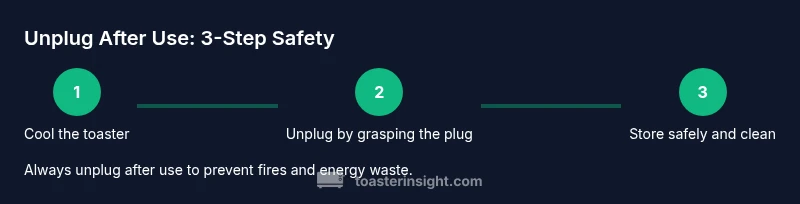
Your end-of-use routine should be deliberate and repeatable. First, confirm the toaster is cool to touch and that no steam or heat is coming from the unit. Then switch off any control lever or setting, so the appliance is in a dormant state. Next, grip the plug firmly (not the cord), and pull it straight out from the wall outlet with a steady, even motion. Place the plug on a dry surface away from the edge of the counter. Inspect the cord and the outlet area for signs of wear or scorching; if either is found, stop using the appliance and arrange for service or replacement. Finally, wipe away crumbs from the crumb tray area and let the unit cool completely before storing. If cleaning, never immerse the toaster or allow liquid to contact the electrical components. This routine keeps the risk of electrical faults low and preserves outlet health.
Safety considerations with outlets, strips, and extension cords
Toasters are designed to be used with standard outlets, and using power strips or extension cords can complicate safety. Never daisy-chain a toaster through multiple adapters or plugs. A damaged or loose outlet can heat quickly, especially when a small appliance is connected. If you rely on a power strip, ensure it has surge protection and sufficient amperage for your region, and avoid overloaded strips. When unplugging, always pull from the wall outlet or the plug itself, not from the strip, to minimize stress on the strip's connections. Keep cords away from sinks, water spills, and cooking vapors. Regularly inspect cords for cracks, fraying, or scorch marks, and replace if you see damage. These habits help keep your kitchen safer and protect the investment in your toaster.
Cleaning, maintenance, and storage after unplugging
Unplugging after use also simplifies cleaning. Remove the crumb tray, wipe it with a dry or slightly damp cloth (never wet the interior), and let it dry before reinserting. Do not clean the interior of the toaster with liquids; use a soft brush to remove loose crumbs. After cleaning, reassemble the unit and ensure the plug and cord are completely dry before plugging in again. Store the toaster on a stable surface away from heat sources and out of the reach of children. If you notice burnt odors, excessive heat, or scorch marks on the cord, stop using the appliance and seek professional service. Maintaining a dry, cool, and clear workspace will extend the life of your toaster and keep your kitchen safer.
Common mistakes and myths to avoid
One common mistake is leaving the toaster plugged in while it’s hot or while cleaning nearby surfaces; the heat can transfer to the cord and outlet. A popular myth claims that tiny standby power is negligible; in practice, unplugging after use eliminates this draw entirely and contributes to energy savings over time. Another error is yanking the cord to unplug; this can loosen the plug and damage the outlet. Some homes rely on a power strip with overloaded prongs, which can trip and ruin a toast-making morning. Finally, assuming all outlets are equal—older walls may have degraded connections that heat more quickly, so consider dedicated outlets for high-use appliances.
Energy savings and outlet longevity
Simple, consistent unplugging after use reduces energy waste in the kitchen, especially in households with multiple appliances on a single outlet. The power drawn by a toaster when idle is minimal, but repeated small draws add up over weeks and months. By removing the device from the outlet when not in use, you also reduce the strain on the same circuit that could contribute to heat buildup behind the outlet box. This practice protects both the appliance and the home wiring by limiting heat accumulation. For homeowners focusing on long-term reliability, unplugging after use is a practical, low-effort habit that complements other safety steps such as keeping outlets dry and cords untangled.
Practical tips for busy kitchens
For a quick routine, keep a small reminder near the outlet: unplug toaster after use. If you cook frequently, adopt a routine where you switch the toaster off, unplug, and wipe crumbs during the same post-cooking window. Use a dedicated outlet for the toaster to simplify safety checks and avoid shared strip issues. Consider adding a slip of tape to the plug indicating the safe step sequence. When in doubt, pause and re-evaluate the space for potential hazards, especially around water and heat sources. By integrating unplugging into daily flows, you create a safer and more efficient kitchen culture.
Quick reference safety checklist
- Is the appliance cool to touch? If not, wait.
- Is the knob off and the toast cycle complete? Confirm before unplugging.
- Are you grasping the plug, not the cord? Pull straight out firmly.
- Is the area around the outlet dry and clear? Keep water away.
- Have you inspected the cord for wear? Replace if damaged.
- Have you wiped crumbs from the crumb tray? Clean after unplugging.
- Is the unit stored away from heat sources and out of reach? Yes.
Tools & Materials
- None(No tools required for unplugging; use dry hands and a firm grip on the plug.)
Steps
Estimated time: about 3-5 minutes
- 1
Confirm the toaster is cool to touch
Before touching the plug, ensure the exterior feels cool. If warmth remains, wait longer to avoid burns.
Tip: Never unplug while the surface is hot; wait until it’s safe. - 2
Switch off controls
If your model has a lever or dial, return it to the off position so no heat remains in the elements.
Tip: Turning off the switch reduces residual energy but does not remove power until unplugged. - 3
Grip the plug, not the cord
Firmly grasp the plug and pull straight out from the wall outlet with a steady motion.
Tip: If the plug is stiff, gently wiggle while pulling; avoid yanking the cord. - 4
Place the plug on a dry surface
Set the plug on a stable, dry area away from the countertop edge and any liquids.
Tip: Keep the cord loosely coiled to prevent tension on the outlet. - 5
Inspect the cord and outlet
Check for signs of wear, cracking, or scorch marks on the cord or outlet area.
Tip: If you see damage, stop using the appliance and assess replacement options. - 6
Clean crumbs and dry before storage
Remove crumbs with a dry brush, wipe surfaces with a dry cloth, and dry completely before storage.
Tip: Never use liquids inside the toaster and avoid moisture near electrical parts. - 7
Store safely after use
Return the toaster to a stable surface away from heat sources and out of reach of children.
Tip: Keeping the toaster in a dedicated space reduces incidental contact and accidents.
Your Questions Answered
Is it safe to unplug a toaster if it is still warm?
It's safer to wait until the toaster has cooled to touch before unplugging. If you must unplug sooner, handle the plug carefully and avoid touching hot surfaces. In general, cooling minimizes burns and reduces risk to the outlet.
It's safer to wait until it cools, but if you must unplug sooner, handle the plug carefully and avoid touching hot surfaces.
Should I always unplug after every use, even if I'll use it again soon?
Yes, unplugging after use reduces fire risk and energy waste. If you expect to reuse the toaster soon, you can prepare by unplugging once you finish the current cycle and allowing for a quick cleanup.
Yes, unplug after use to stay safe and save energy. If you’ll reuse soon, unplug after you finish the current cycle.
Can I use a power strip to manage unplugging?
It is generally better to plug the toaster directly into a wall outlet. If you use a strip, choose one with surge protection and adequate amperage, and avoid loading it with multiple high heat appliances.
Plug the toaster into a wall outlet if possible. If you must use a strip, ensure it is surge-protected and not overloaded.
What if the outlet is loose or hot?
Stop using that outlet and unplug the toaster if safe to do so. A loose or hot outlet can be a fire risk, and you should have an electrician inspect it before further use.
If the outlet is loose or hot, stop using it and have it inspected before continuing.
How often should I inspect the toaster's cord?
Inspect the cord before each use and after any incident that might have stressed it. Look for cracks, fraying, or scorch marks and replace if damaged.
Check the cord before each use and after any rough handling, and replace damaged cords.
Watch Video
Key Takeaways
- Unplug after use to reduce fire risk.
- Let the toaster cool before unplugging or cleaning.
- Pull from the plug, not the cord.
- Keep outlets and cords dry and undamaged.
- Inspect cords regularly for wear.