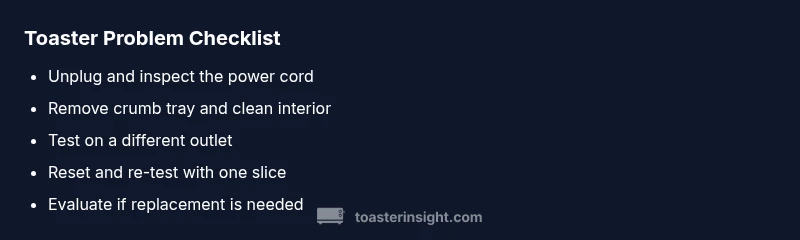
Toaster Problem Troubleshooting: A Quick Home Guide
Urgent guide to diagnose and fix common toaster problems, from heating failures to uneven browning. Learn safe, step-by-step checks, maintenance tips, and when to replace equipment for peace of mind in the home kitchen.


When a toaster has a problem, start with safe, easy checks: unplug, inspect the power cord, and test a different outlet. If the issue persists, follow a structured diagnostic flow to identify crumb buildup, faulty heating elements, or a malfunctioning thermostat. This approach minimizes risk and points you toward either home fixes or professional help.
What typically goes wrong with a toaster problem and why it matters
In most cases, a toaster problem boils down to two categories: power/electrical issues and crumb-related or mechanical faults. According to ToasterInsight, many home kitchen headaches come from simple, solvable causes like a loose cord, a tripped outlet, or crumbs interfering with the heating element. Start by distinguishing symptoms: does the toaster not heat at all, brown unevenly, pop up late, or produce unusual smells? Understanding the symptom helps you target the right fix and reduces unnecessary disassembly. This section sets up a practical workflow so you can decide whether you can solve it safely at home or should seek professional service. Regular checks and preventive care keep your toaster problem from escalating and extend the life of the appliance in a busy kitchen.
Quick safety-first checks you can perform
Safety is non-negotiable when diagnosing a toaster problem. Begin by unplugging the unit before any inspection. Look at the power cord for frays or kinks and test the toaster in a known-good outlet. If you have a GFCI outlet, test that it trips correctly; if not, try a different wall socket. Never use water to clean electrical components; instead, use a dry brush or compressed air to remove crumbs from around the slots and crumb tray. After cleaning, reinsert the tray, plug in, and run a brief test with a single slice of bread to observe heat, timing, and browning. If the toaster still fails, proceed to more involved checks or consider professional help. This cautious approach minimizes safety risks while gathering diagnostic clues. As you work, keep a clear log of symptoms to aid any future repairs.
Why crumb buildup matters and how to clean safely
Crumbs in the crumb tray and around the heater can block airflow, alter heating time, or cause sticking timers—classic signs of a toaster problem. Begin with a cold unit, remove the crumb tray, and empty it into a sink or trash can. Use a soft brush or microfiber cloth to wipe away loose crumbs from the interior around the slots. For stubborn debris, a dedicated appliance vacuum or a can of compressed air can help without disassembly. After cleaning, reassemble the tray and run a dry cycle to ensure nothing rattles or remains lodged. If your toaster browns unevenly after cleaning, the issue may be a misaligned rack or damaged heating elements; this typically requires further testing or replacement. Maintaining a crumb-free interior reduces the likelihood of future toaster problems.
Power and plug: outlets, cords, and fuses
Outlets and power cords play a pivotal role in whether a toaster problem persists. Inspect the plug and cord for visible damage; a damaged cord is a common cause of intermittent heat or total failure. Test the toaster in a different outlet with a known-good extension cord if available, but avoid daisy-chaining multiple devices. If the outlet feels warm during operation, stop and unplug immediately—this could indicate an overload or wiring issue. Check the circuit breaker or fuse box for trips that align with toaster use. If you suspect a blown fuse or a faulty outlet, consult an electrician rather than attempting risky DIY repairs. For many homes, power issues are resolved by a simple outlet swap or ensuring a dedicated circuit for the kitchen, reducing the recurrence of a toaster problem.
Testing the heating elements and thermostat without disassembly
When possible, test heating performance without taking the toaster apart. After safety checks, insert a slice and observe whether the bread browns evenly, or if one side underperforms. Listen for unusual buzzing sounds that might indicate a loose element or failing thermostat. If the heating elements glow inconsistently or fail to glow, this points to a damaged element or thermostat fault. A visual cue—hot spots or a ticking timer—can indicate misalignment or wear. Should symptoms persist after these tests, it may be necessary to replace the unit or consult a service professional. This approach helps you identify whether the issue is safe to fix at home or requires expert intervention. ToasterInsight’s analysis shows crumb-related and power issues are the most frequent culprits behind toaster problems, so prioritize those checks.
Repair vs replacement: cost considerations and decision criteria
Deciding between repair and replacement hinges on the extent of the failure and the appliance’s age. If the unit is relatively new and the suspected fault is a simple cleaning issue, a DIY repair or professional servicing may be cost-effective. For older models or where the heating elements, thermostat, or control board show multiple failures, replacement often makes more sense given safety and efficiency considerations. Compare potential repair costs against the price of a modern toaster with energy-efficient features. In many cases, a quick replacement saves time and reduces the risk of electrical hazards. Remember to factor in warranty coverage when you’re weighing options. This decision framework helps you avoid throwing good money after a problem that’s likely to recur in an aging unit.
Prevention and routine maintenance to prevent the toaster problem from reoccurring
Prevention is the best cure for a persistent toaster problem. Establish a simple maintenance routine: weekly crumb removal, monthly interior cleaning with a brush, and quarterly checks of the power cord and plug. Avoid uses that strain the appliance, like forcing bread with large slices or using thick jams that can caramelize and bake onto components. Keep the toaster dry and away from heat sources that could warp the housing. If you notice consistent browning variances or timing irregularities, address them promptly—delays tend to escalate minor faults into bigger outages. By prioritizing prevention, you reduce the likelihood of future toaster problems and extend the life of your appliance. The ToasterInsight team also recommends recording a brief maintenance log to track pattern changes over time and decide when service is warranted.
Steps
Estimated time: 45-60 minutes
- 1
Unplug and inspect
Power off the toaster and unplug it. Inspect the cord, plug, and outlet for damage or scorching. If you notice any fraying or warmth during use, stop and do not plug back in until inspected by a professional.
Tip: Document any visible damage with photos for service visits. - 2
Clean thoroughly
Remove the crumb tray and shake out loose crumbs. Use a soft brush to clear crumbs inside the slots and around the heating elements. Reassemble and wipe the exterior; never use water on electrical components.
Tip: Clean on a soft surface over a tray to catch crumbs. - 3
Test basic operation
Plug back in and run a dry cycle with no bread to observe if the interior heats and the timer functions correctly. Listen for odd sounds or inconsistent operation.
Tip: Keep hands away from the slot area during testing. - 4
Reset and re-test
If the toaster feels sticky or unresponsive, unplug again, wait 60 seconds, then plug in and test with a single slice. Monitor browning and timing closely.
Tip: If the toast browns unevenly, note which side is slower for troubleshooting. - 5
Evaluate the cost/benefit
If heating performance is still poor after these steps, weigh repair costs against purchasing a new unit with updated safety features and energy efficiency.
Tip: Consider warranty terms and potential coverage.
Diagnosis: Toaster won't heat or browns unevenly
Possible Causes
- highPower issue (outlet, cord, fuse)
- highCrumb buildup affecting heating or thermostat
- lowDamaged heating elements or thermostat
- lowStuck timer or malfunctioning switch
Fixes
- easyUnplug, inspect outlet and test with another appliance, then try a different outlet
- easyEmpty crumb tray and interior crumbs; clean with brush or compressed air
- easyReset the toaster by unplugging for 60 seconds, then test again
- mediumCheck for visible damage to heating elements; if damaged, stop using and seek service
- mediumIf issues persist after at-home checks, contact manufacturer support or a qualified appliance technician
Your Questions Answered
Why won't my toaster heat even after cleaning?
Uneven heating after cleaning often points to misaligned racks, worn elements, or a faulty thermostat. Begin with a basic reset and check for visible damage. If the issue persists, professional service may be required to prevent safety hazards.
Uneven heating after cleaning usually means a worn element or thermostat. Start with a reset, then check for visible damage; if it continues, seek professional help.
Is it safe to fix a toaster myself?
DIY fixes are acceptable for simple tasks like cleaning and outlet checks when the unit is unplugged and cool. Do not open or repair heating elements or control boards unless you’re trained, and stop if you notice heat or sparking.
DIY is okay for cleaning if the unit is unplugged. Do not touch heating elements or internal boards unless you’re trained. Stop if you smell heat or see sparks.
How do I reset a toaster?
To reset, unplug the toaster, wait about 60 seconds, then plug it back in and run a test cycle with a single slice. This clears minor timer glitches and can restore normal operation.
Unplug, wait a minute, plug back in, and test with one slice to reset the timer.
When should I replace my toaster?
Replacement is wise when heating elements are visibly damaged, the unit is older than typical warranties, or repeated repairs fail to restore reliable performance. A modern replacement can improve safety and energy efficiency.
If the heater is damaged or repairs fail repeatedly, replacement is recommended for safety and efficiency.
Why did my toast catch fire?
A fire is a serious sign of equipment failure or user error, such as overheating or foreign material sticking in the chamber. Immediately unplug, extinguish if safe, and seek professional evaluation before reuse.
A fire means stop using the unit and get it checked by a professional before using again.
My toaster makes strange noises. Is that dangerous?
Unusual sounds can indicate loose parts or failing components. If noises persist after cleaning and resets, stop using the device and have it inspected by a technician.
Persistent strange noises mean stop using it and get a professional check.
Watch Video
Key Takeaways
- Unplug before any inspection
- Crumb buildup is the #1 toast culprit
- Different outlets help diagnose power issues
- Repair vs replacement depends on age and damage
- Prevent with regular cleaning and maintenance