Toaster Repairs: Safe Step-by-Step Home Guide
A practical, educational guide for homeowners on toaster repairs. Learn diagnostics, disassembly, testing, maintenance, and safety to fix common toaster problems at home.


In this how-to, you’ll learn a safe, step-by-step approach to toaster repairs that covers diagnosis, disassembly, testing, and reassembly. You’ll need basic tools, a non-conductive workspace, and patience. The goal is to extend appliance life with careful, safe home repairs rather than rushing to replacement.
Understanding the repair landscape for toaster repairs
Toaster repairs are a practical skill for homeowners who want to extend the life of a kitchen workhorse. When performed safely, many common issues—like uneven toasting, jams in the carriage, or crumb buildup—can be resolved at home. According to ToasterInsight, toaster repairs can extend your appliance life when done with proper precautions. This guide focuses on practical diagnostics, safe disassembly, and careful testing, emphasizing that not every fault is worth pursuing at home. If a fault involves main power wiring, a damaged heating element, or sparking, professional service is advised for safety and liability. As you work through these pages, remember that the goal is smarter maintenance that keeps your mornings smooth and your countertop clutter-free.
Common faults that spark toaster repairs
Toasters fail for a handful of predictable reasons. Uneven browning or burnt spots often trace to heating element wear or misaligned bread guides. Crumb buildup is the most frequent culprit for smoking smells or slow toasting. Jams in the carriage prevent bread from feeding consistently. A tripped outlet or a frayed cord can mimic other problems, making diagnosis challenging. In many cases, cosmetic issues such as a stuck lever or a loose crumb tray are the easiest to fix. Throughout toaster repairs, focusing on symptoms first helps you decide whether you can safely proceed at home. The ToasterInsight team notes that keeping the crumb tray clean and the exterior dry dramatically reduces recurring issues.
Safety guidelines before you begin
Safety is non-negotiable in toaster repairs. Unplug the unit and wait at least 60 seconds for capacitors to discharge before touching any interior parts. Work on a non-conductive surface, with dry hands and contained lighting to avoid spills. Keep a small, fire-safe tray nearby for screws and tiny components. Wear safety goggles and non-conductive gloves whenever you open the housing. Never work on a live appliance or in a damp kitchen. If you smell burning insulation or see smoke, stop immediately and unplug the device. These precautions protect you and extend the toaster’s usable life.
Diagnostic foundations: quick checks before disassembly
Start with non-invasive tests before you remove any screws. Confirm the outlet is supplying power with another device. Check the crumb tray and slot for visible debris; clean as needed. Inspect the plug and cord for cracks or exposed wires. Listen for odd noises when you toggle the lever. If the toaster lights but won’t heat, the issue is likely in the heating circuit or thermostat rather than a simple jam. Document your observations and proceed only if you feel confident in basic electrical checks and safe disassembly. Toaster repairs rely on building a chain of evidence from symptoms to probable causes.
Tools and materials you’ll need for toaster repairs
A basic toolkit makes the process smoother. You’ll want a screwdriver set with flat and Phillips heads, a multimeter for continuity checks, soft brushes for crumbs, a non-conductive pair of tweezers, heat-resistant gloves, and a clean microfiber cloth. Keep a small tray for fasteners and spare parts. Having a fresh supply of replacement food-safe gaskets and basic fuses on hand helps you complete the job without repeated trips to the hardware store. Precision and organization reduce the risk of losing tiny screws inside the housing. Remember: use the right tool for the job to prevent further damage to delicate components.
Step-by-step repair overview
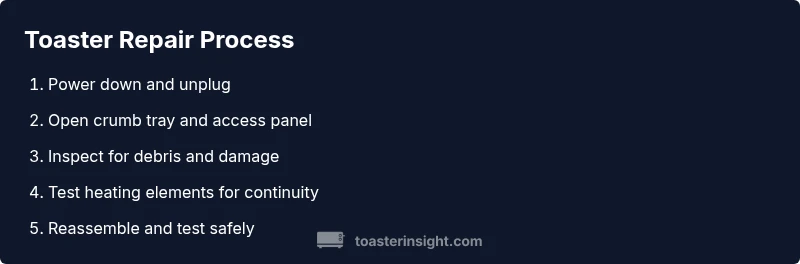
This section provides a high-level roadmap that aligns with the detailed steps in the STEP-BY-STEP block. You’ll verify safety, inspect for obvious damage, clean internal components, test heating elements, and reassemble with careful testing. Don’t rush—the goal is reliable operation, not a quick cosmetic fix. Consulting service manuals or manufacturer schematics can prevent missteps when identifying parts like thermal fuses or bimetal thermostats. Throughout toaster repairs, keep a log of parts inspected and tests performed to guide future maintenance. The process prioritizes safety, accuracy, and repeatability over speed, especially for older models.
Maintenance habits to prevent future toaster repairs
Regular cleaning dramatically reduces risk and extends life. Empty the crumb tray after each use and wipe the interior with a dry microfiber cloth to prevent crumb buildup. Inspect the lever mechanism for alignment and lubricate moving parts sparingly if the manufacturer permits. Keep the exterior dry and avoid moisture near electrical contacts. A yearly visual inspection helps catch early signs of wear—frayed cords, corroded connectors, or loose screws. Proper maintenance also means testing the toaster after a deep clean to ensure it still operates within safe temperature ranges. Consistency is key to long-term reliability in toaster repairs.
When to replace vs repair
Not every fault warrants repair. If the heating element shows signs of significant wear, or if a thermostat or control board fails repeatedly after a few cycles, replacement becomes more cost-effective. If a unit is older, lacks spare parts, or incurs frequent failures, replacing it with a newer energy-efficient model may offer better value. Consider the overall cost, time, and safety considerations when deciding. For homeowners, weighing repair complexity against replacement cost is central to a smart, budget-friendly choice in toaster repairs.
Safety standards, disposal, and warranty considerations
Always check the warranty before attempting repairs, as opening the housing could void coverage. If you must dispose of a faulty toaster, follow local electronics recycling guidelines to recover materials responsibly. For safety, never bypass fuses or safety interlocks, and avoid using damaged cords or plugs. If you observe consistent failures or unusual odors after a repair, contact the manufacturer or a qualified technician. Adhering to safety standards keeps you, your family, and your kitchen safe while you apply practical knowledge in toaster repairs.
Tools & Materials
- Multimeter(For continuity and resistance checks on heating elements and circuits)
- Screwdrivers (Phillips and flat-head)(For opening the housing and removing components)
- Soft brush or microfiber cloth(For crumb removal and interior dusting)
- Non-conductive tweezers(To handle small parts without touching metal contacts)
- Heat-resistant gloves(Protection when handling hot internal parts after testing)
- Safety goggles(Eye protection during disassembly and testing)
- Replacement parts kit (optional)(Thermal fuse, heating element segments, or thermostat if you know the exact fault)
Steps
Estimated time: 45-60 minutes
- 1
Power down and unplug
Ensure the toaster is unplugged from the wall and place it on a dry, non-conductive surface. Wait at least 60 seconds to allow any residual charge to dissipate before handling interior parts.
Tip: Never touch interior metal components while the unit is plugged in; disconnect power first. - 2
Remove the crumb tray and access panel
Gently slide out the crumb tray and remove any screws securing the access panel. This step gives you clean visibility of the interior and helps you locate debris and potential blockages.
Tip: Keep screws in a labeled tray to prevent loss. - 3
Inspect for visible damage
Look for burnt wiring, melted insulation, or broken heat elements. Check the lever mechanism for alignment and the carriage path for obstructions.
Tip: Document any signs of wear and avoid forcing components. - 4
Test continuity of heating elements
With the unit powered off, use a multimeter to check resistance across heating elements. Compare readings with the manufacturer’s specs if available.
Tip: If you’re unsure about expected values, consult the service manual. - 5
Check safety interlocks and thermals
Test thermal fuse or thermostat connections for continuity. A blown fuse will interrupt power to the heating circuit even if other components seem fine.
Tip: A blown fuse is a common repair that often saves the whole unit. - 6
Clean and reassemble
Remove any remaining crumbs, wipe surfaces dry, and reassemble the access panel and crumb tray. Ensure all screws are tight but not over-torqued.
Tip: Dry surfaces prevent future electrical issues. - 7
Power up and test function
Plug the toaster back in and run a few test cycles with empty bread to confirm safe operation and even browning.
Tip: Listen for odd sounds or smells during the initial tests. - 8
Document outcome and plan maintenance
Note the fault, parts tested, and results of the test run. Schedule regular maintenance to prevent recurrence.
Tip: Keep a simple repair log for future reference.
Your Questions Answered
What should I do first if my toaster won’t heat?
First confirm power at the outlet and unplug the unit. Check the crumb tray for debris and inspect the cord for damage. If these don’t reveal the issue, you may need to test the heating element or thermostat with a multimeter.
First, check the outlet and unplug the toaster, then inspect for debris and cord damage. If that doesn’t fix it, you may need to test the heating element.
Is it safe to repair a toaster at home?
Yes, many safe repairs can be done at home with the unit unplugged and with proper tools. Avoid dangerous repairs if you encounter sparking, damaged wiring, or burning smells—these require professional service.
Repairing at home is possible if you unplug the toaster and use proper tools; avoid fixes if you smell burning or see damaged wiring.
How can I tell if heating elements are failing?
Signs include uneven toasting, cold spots, or consistent failure across cycles. Use a multimeter to check resistance across each element and compare with the expected range from the manual.
Look for uneven browning or no heat, and test with a multimeter to confirm element resistance.
What safety precautions should I take before repairing a toaster?
Unplug the unit, allow time for capacitors to discharge, work on a dry surface, wear eye protection, and keep a fire-safe area for testing. Do not attempt repairs if you’re uncertain.
Unplug, wait, and work on a dry surface with eye protection. If unsure, seek professional help.
What if my toaster smells burnt after a repair?
A burnt smell can indicate overheating or debris. Power off, unplug, and inspect for residual crumbs or misaligned components. If it persists, discontinue use and seek professional inspection.
If you smell something burnt, turn it off and inspect; persistent smells mean you should stop using it and get a pro check.
When should I replace a toaster instead of repairing it?
Replacement is sensible when the unit is old, repeatedly fails, or repair costs approach the price of a new unit. Consider energy efficiency and warranty when making the call.
If repairs keep failing or the cost nears a new unit, replacement is a smarter choice.
Watch Video
Key Takeaways
- Learn to diagnose safely before disassembly
- Use the right tools to avoid damaging components
- Regular cleaning reduces future toaster repairs
- Know when to repair vs replace for cost efficiency
- Document steps for easier maintenance in the future