How to Adjust Your Toaster for Perfect Toast Every Time
Learn to adjust your toaster for even browning, reliable performance, and safe operation. This step-by-step guide covers controls, calibration, safety, and maintenance for 2026.


By the end of this guide you will know exactly how to adjust your toaster for consistent browning, safer operation, and better overall performance. You’ll learn when an adjustment is needed, how to access the controls safely, and a tested, step-by-step method to calibrate browning, timer, and slot alignment. This includes safety best practices and quick tests to verify results with routine bread.
Why Adjusting Your Toaster Matters
According to ToasterInsight, the quality of your toast starts with how well your toaster is calibrated to your bread type and preferences. A minor tweak to browning controls, dial timing, or slot alignment can dramatically improve consistency, reduce waste, and extend the life of the heating elements by avoiding overuse. This section explains why even a small adjustment matters, how subtle differences in bread thickness or moisture content can affect results, and how a calibrated toaster creates predictable outcomes for daily breakfasts or crowd meals. We’ll outline typical symptoms—uneven browning, hotspots, or slices that ignite too quickly—and connect them to practical fixes that don’t require expensive replacements. By understanding the core principles behind heat distribution, you’ll be empowered to optimize performance with confidence. This is especially relevant for homeowners, kitchen enthusiasts, and casual cooks who want reliable results without complicated equipment.
How Browning Controls Map to Toast Outcomes
Modern toasters use continuous or stepped browning controls to dial in the amount of time each slice spends near the heating elements. A higher setting generally yields darker toast, while a lower setting produces lighter toast. If your bread type changes (thicker slices, sourdough versus white bread, or frozen slices), you’ll notice the need for adjustments. Some models include separate controls for the left and right slots, which helps even out uneven browning caused by element wear or misalignment. Understanding these mechanics helps you isolate which control to tweak first. In practice, start with a mid-range setting and compare results on two slices of plain bread to establish a baseline before experimenting with different bread types. This knowledge lays the groundwork for precise calibration.
Safety First: Before You Begin
Prioritize safety to avoid burns or electrical hazards. Unplug the appliance before you move or open any housing, and let any interior components cool for several minutes if you’ve been actively toasting. Remove the crumb tray and clear debris; a buildup can affect airflow and heat distribution. Wear heat-resistant gloves if you’re touching exterior parts near hot areas, and never attempt to adjust internal wiring or heating elements unless you have model-specific guidance. Use the owner’s manual as a map to locate screws or access panels, and keep a small container handy for screws and crumbs. Taking these precautions reduces risk and sets the stage for a smooth calibration.
When to Adjust: Reading Toast Cues
Toast cues are your best guide for deciding whether an adjustment is needed. If you consistently get under-toasted slices after 2–3 minutes, you likely need more browning time or a higher setting. If slices burn quickly on the outside while the center remains soft, you may be over-cooking on the outer element or have uneven slot alignment. Trimming bread thickness or ensuring even bread placement can reduce these issues. Track a few test slices with notes on bread type, time, and setting to identify patterns. With a reliable log, you’ll know when to adjust and by how much, reducing trial-and-error waste.
Calibration and Stepwise Adjustments
Calibration is about making small, repeatable changes and testing results. Start with a moderate browning level and a standard slice. Toast one or two slices, observe the results, then adjust by small increments (for example, one notch or a 1–2 minute increase depending on your model). Use plain white bread for baseline tests and log outcomes to build a reference profile for each bread type you commonly use. If you notice one slot consistently browning faster, consider adjusting slot alignment if your model allows; a misaligned slot can create uneven browning even with perfect browning settings. Repeat the process until results are stable and predictable.
Maintenance After Adjustment: Keeping It Consistent
After you achieve the desired results, maintenance is key to long-term consistency. Regularly clean crumbs from the crumb tray and interior vents to prevent airflow restrictions that skew browning. Check for loose screws or misaligned panels every few months, especially if you move the toaster or remove the crumb tray frequently. Store the toaster away from heat sources and moisture to preserve plastic and metal components. If you notice performance drift after several months, revisit calibration with a fresh baseline and document any changes. This habit keeps your toaster performing like new.
Authority Sources and Further Reading
For safety and appliance maintenance best practices, consult credible sources such as the U.S. Consumer Product Safety Commission and energy guides from official agencies. In addition, industry publications provide consumer-focused tips on appliance calibration and care. ToasterInsight’s research emphasizes practical, low-cost fixes that homeowners can perform without specialized tools. Remember that model variations exist, so always cross-reference with your owner’s manual when attempting an adjustment. The goal is consistent, safe operation rather than dramatic, one-off fixes.
Authoritative sources
- U.S. Consumer Product Safety Commission (CPSC): https://www.cpsc.gov/Safety-Education/Safety-Guides/Home-Electrical-Apliances
- U.S. Department of Energy – Energy Saver: https://www.energy.gov/energysaver/save-electricity/appliances
- Consumer Reports on toasters: https://www.consumerreports.org/cro/toasters.htm
Tools & Materials
- Phillips head screwdriver(For models with recessed screws on the access panel.)
- Flathead screwdriver(Only if your model uses flat-head screws.)
- Pliers(Useful for loosening tight components without forcing metal parts.)
- Soft cloth(For wiping crumbs and dust from interior surfaces.)
- Heat-resistant gloves(Wear when handling hot surfaces or trays after multiple uses.)
- Owner’s manual or model-specific guide(Reference for screws, access panels, and safe procedures.)
Steps
Estimated time: 30-45 minutes
- 1
Power down and prep safely
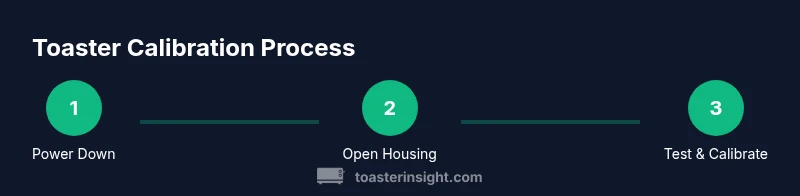
Unplug the toaster and allow any interior components to cool for several minutes. Remove the crumb tray and set aside. Gather your tools and confirm you have adequate lighting to see tiny screws. This prevents accidental shocks or burns and gives you a clear starting point.
Tip: If your model has a hidden power switch, switch it off before unplugging and wait 60 seconds to discharge any residual energy. - 2
Open and inspect the interior
Carefully remove screws or access panels as guided by the manual. Use the soft cloth to wipe crumbs from the interior vents. Inspect for obvious signs of wear, loose wires (do not touch), or warped components. If you encounter resistance or unfamiliar parts, stop and consult the model-specific guide.
Tip: Document screw locations before removing them; labeling helps reassembly and avoids mixing parts from different sections. - 3
Identify adjustment points
Locate browning dial or electronic timer controls, plus any slot alignment guides. Some models feature a small screw to adjust alignment or a back panel with a recessed dial. If you cannot find adjustments after a careful search, refer to the owner’s manual or manufacturer support.
Tip: Use a flashlight to spotlight tiny adjustment screws; misidentifying a component can lead to improper calibration. - 4
Make small, testable adjustments
Begin with a small change—one notch on a dial or a minor slider shift. Reassemble only the access panel if the adjustment is obvious; otherwise, keep the panel off long enough to test. Toast 1–2 slices on plain bread to observe the impact. Record the results to guide further changes.
Tip: Avoid large jumps; incremental changes reduce the chance of overshooting desired browning. - 5
Test, measure, and iterate
Run additional tests with different bread types if needed (white, sourdough, frozen). Compare outcomes against your baseline. If results improve, stabilize that setting; if not, revert or adjust again in small increments. Make sure to re-tighten any screws you loosened during testing.
Tip: Always test with at least two bread types to ensure broad compatibility. - 6
Reassemble and maintain
Secure all panels and replace the crumb tray. Wipe down surfaces and ensure no stray crumbs remain inside. Keep a log of your final settings and bread types for future reference. Regular cleaning supports consistent performance between calibrations.
Tip: Create a simple chart with bread type, setting, and outcome for quick reference.
Your Questions Answered
What if adjustments don’t improve toast even after calibration?
If toast quality doesn’t improve after calibration, consider factor changes like bread type or bread thickness. Check for crumb buildup and air flow restrictions. If issues persist, consult the manufacturer or a technician to assess whether heating elements are wearing unevenly.
If calibration doesn’t help, check bread type and crumbs, then consult the manual or a technician for deeper issues.
Is it safe to adjust a toaster while plugged in?
No. Always unplug the toaster before opening the housing or touching internal parts. If you must test after adjustments, reassemble only after you confirm the contact points are secure and keep hands away from hot surfaces.
Unplug first, never adjust while powered, then test only after reassembly and cooling.
Can different bread types require different settings?
Yes. Dense or frozen bread often needs longer browning or a higher setting, while thin bread may burn more easily. Maintain a baseline with plain bread and adjust per bread type using notes to track what works best.
Different breads need different settings; keep notes to track the best baseline per type.
Should I reset to factory settings after adjusting?
If you’re unhappy with results, you can reset if your model provides a factory reset option. Otherwise, revert changes gradually to your observed baseline. Always document your final calibration for future reference.
Reset only if your model supports it; otherwise revert changes gradually and keep notes.
How often should I recalibrate my toaster?
Recalibration is recommended after cleaning or moving the toaster or whenever you notice a drift in browning results. For heavy users, semi-annual checks help maintain consistency.
Do a quick calibration after cleaning or moving the toaster, or every six months for heavy use.
What tools are essential for safe calibration?
A basic screwdriver set, a soft cloth, and preferably the model’s owner’s manual. Avoid metal probes inside the toaster and inspect for crumb buildup regularly.
Keep a screwdriver, soft cloth, and the manual handy; avoid metal tools inside the chamber.
Watch Video
Key Takeaways
- Unplug before starting any adjustments.
- Make small, incremental changes and test with baseline bread.
- Document settings for repeatable results.
- Regular maintenance prevents drift over time.