How to Know If Your Toaster Oven Is Convection
Discover simple, practical steps to identify convection capability in your toaster oven, with quick tests, feature cues, and tips from ToasterInsight for better baking results.


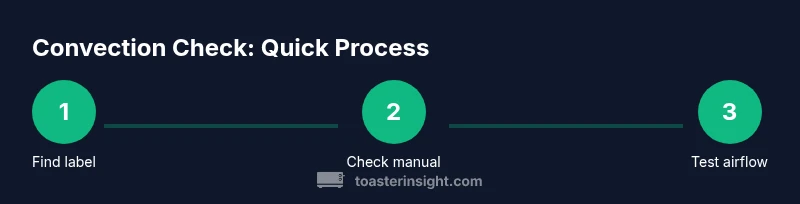
To know if your toaster oven is convection, start by checking for a built-in fan icon or the word convection on the control panel. If absent, inspect the model label or manual to confirm convection capability. You can also run a quick bake test at a moderate temperature and feel for active air movement near the racks.
What convection means for toaster ovens
Convection in toaster ovens refers to a built-in fan that circulates hot air around the cooking chamber. This air movement speeds up heat transfer, promotes more even browning, and can reduce cooking times compared to traditional radiant-heating bake modes. For homeowners and kitchen enthusiasts, understanding convection helps you choose the right setting for everything from cookies to roasting vegetables. The ToasterInsight team highlights that convection is not just about temperature; it’s about controlled air flow that minimizes hot spots and yields consistent results across multiple racks. When you know your appliance supports convection, you can plan meals with greater confidence and predictability, especially for items that benefit from even browning and moisture retention. Remember, not every toaster oven labeled as convection will behave identically; fan speed, vent placement, and overall cavity design all influence performance. The key takeaway is that convection appliances move air, not just heat, and this distinction guides how you bake and roast.
Indicators you actually have convection (visible cues and labels)
Look for clear labeling on the control panel such as the word convection or a fan icon. Some models use terms like “fan bake,” “air bake,” or “turbo” to denote convection modes. If you’re unsure, check the owner’s manual or the manufacturer’s website for your exact model. Manufacturer labeling is often the fastest way to confirm convection capability. In many ovens, the convection setting will also appear as a dedicated button or a submenu within bake modes. If the panel has variable fan speeds, that’s another strong sign you’re dealing with convection. Remember to verify the model number and cross-check with online product specs to avoid confusion between similar-looking models.
Reading the label and manual: where to look for confirmation
Your best source of truth is the product documentation. Locate the model number on the rear panel or door frame, then search the manual (print or digital) for terms like convection, fan-assisted, or air circulation. If you don’t have the manual handy, manufacturer support sites typically offer PDFs by model. Some manufacturers also list convection features on spec sheets or product pages, sometimes under “Cooking Modes” or “Features.” For safety and accuracy, always corroborate the features with the exact model you own, since nearby siblings in the same product line can differ in convection capability.
Quick at-a-glance tests you can perform
Conduct a simple, controlled test to observe convection behavior without making a dish yet. Set the oven to a bake or convection bake mode (if available) and run for a brief period with a light tray of bread or small pastries on two racks. Compare browning and texture to a similar bake on a standard bake setting (if your oven offers one). If you notice faster browning on the convection setting, even heat distribution around both racks, and air movement evident near the door or vents, you’re seeing convection in action. If no air flow or uneven browning occurs, the unit may not be convection-capable or the fan could be dormant. Take notes on timing, browning, and texture to build a practical understanding of how your specific model behaves.
What to expect in convection mode: cooking outcomes and caveats
When used correctly, convection tends to produce crispier exteriors, more evenly cooked interiors, and shorter cooking times for many items. Baked goods like cookies and pastries may spread more evenly and require slightly lower temperatures or shorter times than non-convection settings. Meat and vegetables benefit from faster, more uniform browning and reduced moisture pockets. However, convection can also lead to over-browning if settings are left unchanged from a traditional recipe. Therefore, it’s wise to monitor early batches and adjust times by 5–15% depending on your oven’s fan strength and the size of the food pieces. If you bake on multiple racks, rotate trays to compensate for any hot spots. The goal is consistent color and doneness without drying out the interior.
Common myths and troubleshooting: separating fact from fiction
Myth: All toaster ovens labeled convection cook identically. Reality: Performance varies by fan size, vent placement, and cavity geometry. Myth: Convection always saves energy. Reality: It often reduces cooking time but may not always lower energy use if you open the door frequently. Troubleshooting tip: If you hear a loud fan, feel no air movement, or see uneven browning, verify that the fan is enabled, clean the air intake, and consider checking for a clogged vent. If the problem persists, consult the user manual or contact customer support for your exact model. By understanding these nuances, you’ll avoid misinterpreting a non-convection bake as a faulty appliance and instead learn how to optimize convection performance for your recipes.
How to verify convection when shopping or upgrading
When evaluating new toaster ovens, read the specifications carefully for explicit mentions of convection, air circulation, or fan-assisted modes. Compare models based on fan speed, the number of convection presets, and the overall oven cavity design. If possible, view demo videos or retailer demonstrations that show air movement during convection operation. Write down your must-have features (e.g., multiple rack positions, even heat, quick preheat) so you can quickly assess models against real-world needs. This proactive approach helps you select a unit that truly delivers the convection benefits you’re seeking, rather than relying on marketing alone.
How to maintain convection performance: simple care tips
Convection performance benefits from a clean, unobstructed path for air to circulate. Regularly wipe away crumbs, clean vents, and inspect the fan housing for dust buildup. Make sure racks slide smoothly and aren’t jammed by debris. Avoid storing heavy items on top of the unit which could impede venting. If you notice inconsistent results, recheck seals and door alignment to ensure proper heat retention and air flow. Gentle maintenance ensures your convection toaster oven continues to deliver even browning and efficient cooking.
Shopping and compatibility: bridging knowledge gaps for future purchases
If you’re in the market, prioritize convection-capable models with clear feature labels and accessible manuals. Look for consumer reviews that mention real-world convection performance, particularly for your typical dishes. Remember that a good convection toaster oven is not simply a larger version of a standard toaster oven; it’s a thoughtfully designed appliance with a fan-driven airflow system that affects how heat is distributed inside the cavity.
Tools & Materials
- Toaster oven(Any model you want to check convection capability)
- Owner's manual or manufacturer website(Use for exact features and convection capability)
- Model label or serial plate(Locate the exact model for online search)
- Good lighting(Read small icons and text clearly)
- Notebook and pen(Jot down findings and observations)
- Optional: magnifying glass(Helpful for tiny icons in dim corners)
Steps
Estimated time: 20-30 minutes
- 1
Identify convection controls on the panel
Scan the control panel for a convection label, fan icon, or a dedicated convection button. If the label is unclear, move to Step 2 for confirmation via manuals or model specs.
Tip: If you still aren’t sure after a visual check, use the manual to confirm with the exact model name. - 2
Locate and read the model label/manual
Find the model number on the back or inside the door frame. Look up the exact model in the manual or on the manufacturer site for convection confirmation and feature lists.
Tip: Always verify the exact model; similar-looking units can have different convection capabilities. - 3
Inspect internal vents and the fan area
With the oven cool, open the door and inspect the interior for a visible fan housing or vents around the top or back. A functioning fan is a strong sign of convection.
Tip: Avoid touching any moving parts; ensure power is off before inspection. - 4
Run a controlled convection test
Place a small, light tray on the rack and set the oven to a convection bake mode (if available). Run for a few minutes and observe air movement around the food and racks.
Tip: If you don’t notice air movement, the convection feature may be inactive or absent. - 5
Compare with a non-convection bake
If your unit has a standard bake setting, run a parallel bake with identical temps and time, then compare browning, texture, and interior doneness.
Tip: Note differences in color, moisture, and edge crispiness to gauge convection impact. - 6
Document findings and plan next steps
Summarize whether the unit is convection-capable and how it performs. Use these notes when cooking or shopping to set expectations.
Tip: Keep a quick-reference sheet near the appliance for future use. - 7
Consider maintenance for optimal airflow
Regularly clean crumbs and dust from vents and the fan housing. A clean air path preserves convection efficiency and even cooking results.
Tip: Perform this maintenance every few months or after heavy use. - 8
Use convection appropriately in recipes
When a recipe is written for conventional ovens, slightly adjust times and temperatures for convection to prevent over-browning and drying.
Tip: Monitor early batches and adapt based on your oven’s behavior rather than following a strict timer.
Your Questions Answered
How can I tell if my toaster oven has convection?
Look for a convection label or fan icon on the control panel, check the model’s manual or website, or perform a simple air-flow test to confirm.
Check the control panel for a convection icon or label, then verify with the manual. You can also run a quick air-flow test to confirm.
Do all convection toaster ovens cook faster?
Convection often reduces cooking times due to improved air circulation, but results vary by model and the food being cooked.
Convection can speed up cooking, but results depend on the model and what you’re cooking.
Can I use convection settings for all recipes?
Many recipes work well with convection, but some delicate items may benefit from traditional bake. Start with adjusted times and temperatures, and monitor closely.
You can often use convection, but some recipes need tweaks; monitor and adjust.
Is convection more energy-efficient?
Convection can be energy-efficient by reducing cooking time, though benefits depend on usage and how often you open the door.
It can save energy by shortening cooking, but results depend on how you use it.
What should I do if I don’t hear the fan?
Check that the oven is set to a convection mode and that vents aren’t blocked; if the fan still doesn’t run, consult the manual or support.
If the fan won’t run, verify mode selection and ventilation, then seek support.
How often should I clean the convection fan?
Regular cleaning of vents and the fan housing helps maintain airflow and cooking consistency.
Keep vents clean to preserve airflow and even cooking.
Watch Video
Key Takeaways
- Identify convection cues on the control panel and labeling.
- Consult the manual or model specs for exact convection capability.
- Run a simple, safe air-flow test to observe convection in action.
- Convection changes cooking times and browning; adjust recipes accordingly.
- Maintain clean vents and fan housing to preserve performance.