Why Is My Toaster Oven Not Turning On? A ToasterInsight Troubleshooting Guide
Struggling with a toaster oven that won't turn on? This urgent, step-by-step guide covers quick checks, diagnostic flow, and safe fixes to get your toaster oven heating again.


Most toaster ovens fail to power up due to power or safety interlocks rather than a burned-out control board. Start with the simplest checks: confirm the plug and outlet are working, unplug for a moment to reset, and ensure the door switch and timer are set correctly. If the issue persists, follow the diagnostic flow and step-by-step fixes below. For safety, unplug before inspecting internals.
Why is my toaster oven not turning on? A practical overview
When you ask, why is my toaster oven not turning on, the first thing ToasterInsight recommends is to consider power and safety interlocks before assuming a faulty interior component. In 2026, countless homeowners encounter this issue, and the majority of cases trace back to simple power connections, a door switch, or a mis-set control. This is not a sign of a failing heater coil or printed circuit board unless basic checks have been ruled out. By understanding the common failure modes, you can diagnose quickly and safely. The ToasterInsight team emphasizes a methodical approach: verify power at the outlet, inspect the cord, confirm door closure, and review timer settings. By starting here, you address the most likely culprits and reduce unnecessary repairs. This mindset aligns with practical kitchen diagnostics used in many households and helps you avoid unnecessary expenses.
Quick checks you can perform before calling a repair
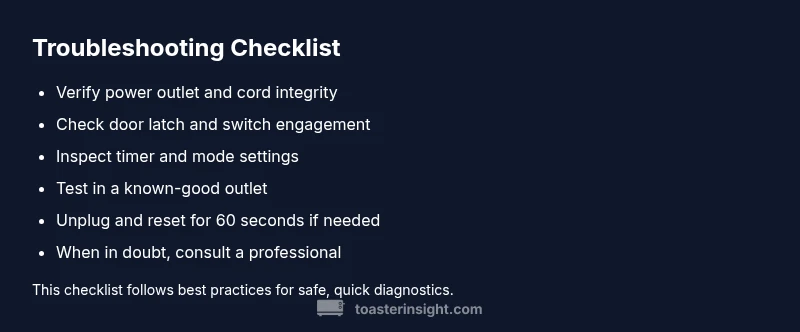
Before you call in a technician, there are several low-effort checks you can perform to pinpoint the issue. These checks are designed to be done with minimal tools and without opening the device. First, ensure the toaster oven is plugged firmly into a live outlet and that the outlet itself is functional by testing with another device. If the outlet is fine, inspect the power cord for visible damage or cracking. Next, unplug the unit for 60 seconds and then plug it back in to reset any minor electronics. Finally, confirm the door is fully closed and that the door latch or switch engages when you attempt to start a cycle. If any of these steps resolve the issue, you’ve prevented a needless service call.
Diagnostic considerations: power, safety interlocks, and control panel
If basic checks fail to restore power, you need a more structured diagnostic approach. Power-related causes top the list: a loose plug, worn outlet, or a blown fuse or tripped circuit breaker. Safety interlocks such as the door switch can prevent the control panel from powering up if the door isn’t properly closed. The control panel itself may be unresponsive due to a simple knob setting that’s off or a timer stuck in a non-start position. In many models, the internal thermal fuse protects the unit from overheating and may have tripped after a fault; modern toaster ovens sometimes require professional service to replace such components. A systematic review of these components will usually reveal the root cause and the right fix.
Step-by-step preview: what to expect in the full fix
In this section you’ll find a detailed, actionable sequence to address the most common causes shown in the diagnostic flow. You’ll see how to isolate the outlet, verify the cord integrity, test the door switch, and ensure the timer/knob is set correctly. This approach minimizes risk and ensures you’re addressing the actual fault rather than guessing. If you reach an issue beyond simple checks, you’ll know when to seek professional help to avoid hazards and ensure the repair is performed safely. The goal is to restore reliable power and safe operation while preserving your appliance.
What to do if it still won’t turn on: safety first
If the toaster oven still refuses to power up after completing the checks and fixes, do not attempt to bypass safety features. A non-starting unit can indicate an internal fault that requires professional service, such as a failed door switch or an internal fuse. Review your warranty status and consider contacting the manufacturer or a qualified technician. Never attempt high-voltage repairs yourself, and avoid using the appliance when the power supply or cord shows damage. Prioritize safety and protect yourself from electrical shock.
Prevention tips and maintenance to avoid future issues
Preventive maintenance reduces the likelihood of a non-start issue. Regularly inspect the power cord for wear, avoid coiling or bending the cord sharply, and keep the outlet area clean and dry. Use a dedicated outlet if possible to minimize nuisance trips on shared circuits. Periodic checks of the door latch and timer can prevent a future misalignment from causing a startup failure. Wipe down the exterior and interior after use to minimize residue that can cause electrical contact issues over time. By integrating these habits, you’ll keep your toaster oven reliable and ready when you need it.
Steps
Estimated time: 25-40 minutes
- 1
Check power cord and outlet
Unplug the toaster oven and inspect the cord for visible damage. Plug the unit into a known-good outlet to see if power returns. If it doesn’t, move to a different outlet to rule out a local outlet problem.
Tip: Inspect both ends of the cord for wear and ensure the plug isn’t loose. - 2
Test the outlet with another device
Plug a lamp or another small appliance into the same outlet to verify it supplies power reliably. If the other device also fails, the issue is likely the outlet or circuit.
Tip: If you’re in a multi-outlet strip, try a direct wall outlet. - 3
Inspect door latch and switch
Close the door firmly and listen for a soft click that indicates the latch engages the switch. If the switch feels loose or the door won’t latch, the unit may show a no-start condition.
Tip: Do not press on the door while testing; use a firm, even closure. - 4
Review timer and mode settings
Ensure the timer knob is set to a valid cooking mode (e.g., bake/toast) and the timer is not in the ‘off’ position. Some models require the timer to complete a cycle before heating.
Tip: Turn the knob slowly to check for any resistance or stiction. - 5
Reset and re-test
Unplug the oven, wait 60 seconds, plug back in, and attempt power-on again. A reset can clear minor electronics faults.
Tip: Must be done with the unit unplugged for safety. - 6
Evaluate the need for professional service
If power remains absent after all checks, the fault is likely internal (board, fuse, or inlet). Schedule service or contact the manufacturer for warranty support.
Tip: Document observations and any failed tests for the technician.
Diagnosis: Toaster oven won't turn on
Possible Causes
- highPower outlet or plug is loose, damaged, or dead
- highTripped circuit breaker or blown fuse
- mediumDoor latch switch failing, preventing the control panel from engaging
- lowFaulty control board or power inlet
- lowInternal thermal fuse has opened due to overheating
Fixes
- easyTest the outlet with a known-good device to confirm power
- easyReset the circuit breaker or replace a blown fuse if safe to do so
- easyInspect and reseat the power cord; replace if cracked or damaged
- easyVerify the door closes fully and the latch engages the switch
- mediumIf the issue is a faulty control board or thermal fuse, contact a professional
Your Questions Answered
What is the most common cause of a toaster oven not turning on?
Power supply problems, such as a loose plug or a tripped circuit, are the most frequent culprits. A faulty door switch can also prevent startup. If basic checks don’t fix it, move on to the diagnostic flow.
The most common causes are power supply problems and a door switch. If these checks fail, continue to the diagnostic steps.
Can a door switch prevent the toaster oven from starting?
Yes. If the door switch isn’t engaging properly, the appliance may refuse to start as a safety precaution. Verify the door closes firmly and the switch clicks.
A faulty door switch can stop startup. Check the door closure and listen for the switch click.
Is it safe to inspect internal components?
Only with the unit unplugged. Do not attempt high-voltage repairs. If you’re unsure, contact a professional technician.
Only inspect internals when the unit is unplugged. If unsure, call a pro.
My toaster oven turns on but doesn’t heat. What should I check?
Check the heating elements for visible damage, ensure the timer is set correctly, and inspect the control board for unusual indicators. If problems persist, a professional inspection is recommended.
If it powers on but won’t heat, inspect elements and settings; persistent issues require a pro.
How do I reset the toaster oven’s control panel?
Unplug the unit, wait a full minute, then plug it back in and try again. This can clear minor glitches in the control electronics.
Unplug, wait, plug back in, and retry to reset the control panel.
When should I replace vs. repair?
If the fault is in a critical component like the control board or a recurrent fuse, replacement is often more reliable. Check warranty and consider repair only if within coverage and cost-effective.
Consider replacement for major internal faults, check warranty, and compare repair costs.
Watch Video
Key Takeaways
- Check power and outlet health first
- Inspect the door switch and timer settings
- Use the diagnostic flow to isolate the fault
- When in doubt, contact support or a pro
- Maintain cords and dedicated outlets to prevent future issues