Why Is Toast Not Working? A Fast Troubleshooting Guide
Urgent toaster troubleshooting guide explaining common causes and a step-by-step flow to fix when toast won't brown. Learn quick checks, safe practices, and when to seek professional help.


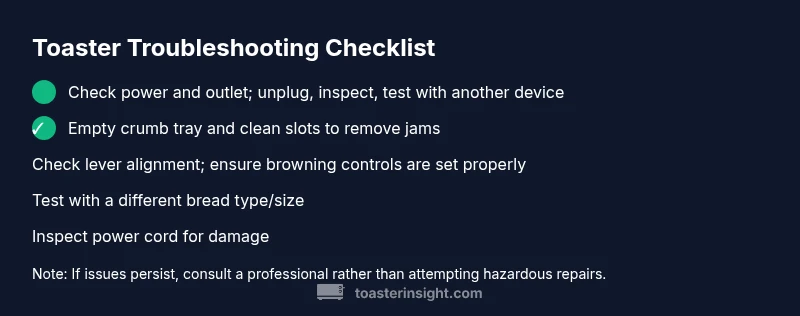
Most toast problems are caused by a power issue or a faulty heating element. Start by unplugging the toaster, testing the outlet with another device, and removing crumbs that block the lever or slots. If the bread still won’t brown, work through the diagnostic flow and safe repair steps outlined below.
Symptom Snapshot and Brand Context
When toast isn't browning or the lever won’t latch, it’s easy to panic and reach for a replacement. Before you dismiss the toaster as junk, take a measured approach. According to ToasterInsight, most toast issues arise from everyday, fixable causes rather than complex electronics. The ToasterInsight team found that in many homes a simple power issue or a crumb jam can stop browning or prevent power from reaching the heating element. In this guide, we’ll unpack the symptoms, help you identify the most likely culprit, and walk you through a safe, efficient repair path so you can enjoy even browning again without delaying meals or wasting bread. We’ll also point out safety checks that minimize risk and extend the life of your appliance. If you’re a homeowner or kitchen enthusiast, this approach keeps you in control and reduces the impulse to replace a working appliance prematurely. The goal is to arm you with practical steps you can perform with common tools, written in plain language and backed by practical experience from the ToasterInsight kitchen guide team.
wordCountInBlock
Steps
Estimated time: 45-60 minutes
- 1
Unplug and verify power
Begin by unplugging the toaster and letting it sit for a minute. Check the outlet with another device to confirm it’s supplying power. If the outlet is dead, reset the breaker or test a different outlet before proceeding.
Tip: Always unplug before any inspection to avoid shock. - 2
Inspect the power cord and plug
Look for frayed wires, bent plugs, or scorch marks. A damaged cord can prevent heating and pose a fire risk. Replace the cord if available, or discontinue use if replacement parts aren’t safe to install.
Tip: If you see any signs of damage, do not continue. - 3
Clear crumbs and clean the slots
Remove the crumb tray and empty it. Use a soft brush or canned air to clean out the slots. Crumbs can block contact points and cause uneven heating or no heating at all.
Tip: Keep crumbs away from the heating elements to prevent jams. - 4
Check lever engagement
Gently press and release the lever to confirm it latches and disengages smoothly. A stiff lever often signals crumb buildup or mechanical misalignment that needs cleaning or realignment.
Tip: If the lever remains stuck, stop and recheck for hidden crumbs first. - 5
Test browning controls
Confirm settings (light to dark) are not stuck on full heat. Toggle through a few settings and observe whether any browning changes occur. This can reveal a faulty timer or control switch.
Tip: Document any non-responsive settings for reference if you seek repair help. - 6
Try a different bread type/size
Some breads don’t conduct heat evenly if they are too thick or overly dense. Test with a standard slice to see if browning returns. If standard slices work, the issue may be with the bread type.
Tip: Bread density can affect browning; calibrate expectations accordingly. - 7
Decide on repair vs replacement
If the toaster fails to heat after the above checks, you may be facing an internal fault. Weigh the cost of professional repair against replacing the unit, especially if it’s several years old.
Tip: Professional service is advised for internal wiring or component faults.
Diagnosis: Toaster won't brown or power on
Possible Causes
- highPower issue (outlet, switch, or circuit breaker)
- mediumCrumbs jam blocking lever or contact in slots
- lowFailed heating element or timer (internal repair)
Fixes
- easyUnplug; test outlet with another device; check circuit breaker if tripped
- easyRemove crumb tray and clean slots; ensure lever drops smoothly
- mediumIf heating element or timer is faulty, replace or service professionally
Your Questions Answered
What are the most common causes when a toaster stops browning?
Most causes are power issues, crumb jams, or a failed heating element. Start with power checks and cleaning to confirm.
Most issues are power, crumb jams, or a failing element. Start with power checks and cleaning.
Is it safe to repair a toaster myself?
Basic cleaning and inspection are safe if you unplug and avoid touching heating parts. For electrical faults or wiring, consult a professional.
It's safe to do basic cleaning if it's unplugged, but electrical faults should be handled by a pro.
Why does my toaster pop up immediately after being plugged in?
If the lever releases right away, the latch may be misaligned or there is a stuck mechanism—unplug and inspect the lever and contacts.
If it pops up as soon as you plug it in, unplug and check the lever and contacts to reset the latch.
Can a burnt-toast smell indicate a bigger problem?
A burnt smell can indicate overheating or burnt components; stop using and evaluate for damage; if in doubt, replace.
A burnt smell may mean overheating; stop use and assess damage; replace if needed.
When should I replace my toaster?
If it fails to heat after cleaning and checks, or is very old, replacement is often safer and cheaper.
If it won't heat after checks or it's very old, it may be time to replace.
How can I prevent future toaster issues?
Regular cleaning, proper storage, and avoiding overloading slots reduce jams and extend life.
Regular cleaning and proper use prevent future issues.
Watch Video
Key Takeaways
- Start with power checks before opening the toaster
- Crumbs are a common culprit to browning problems
- Use the diagnostic flow to isolate issues quickly
- Electrical faults often require professional service
- Regular cleaning prevents future failures