Why Is Toast Not Working Today? Quick Troubleshooting Guide
Urgent guide to fix toast problems today. Step-by-step troubleshooting for toasters and toaster ovens with safety tips, maintenance, and pro tips from ToasterInsight.


Toast malfunctions usually come from power or settings. Check that the appliance is plugged in, the outlet works, and the browning dial is correctly set. If the light won’t come on or the unit won’t heat, try another outlet or reset the breaker. These quick checks resolve many why is toast not working today scenarios.
Why toast not working today: quick overview and brand context
Why is toast not working today? When your morning slice refuses to brown or the toaster refuses to power on, you’re not alone. This section lays out the practical, no-jargon approach to diagnosing common toaster and toaster-oven issues. According to ToasterInsight, many toast problems begin with simple power or setting problems rather than expensive internal repairs. Before you jump to conclusions, confirm the basics: the appliance is plugged in, the outlet provides power, and the browning control is set to a heat level that will actually produce browning. If the indicator light is dim or absent, switch outlets or reset the circuit. Addressing the basics often restores regular toasting and prevents needless service calls. Keep safety in mind and proceed calmly—most early faults are easy to fix with minimal tools.
Quick checks before you dive in
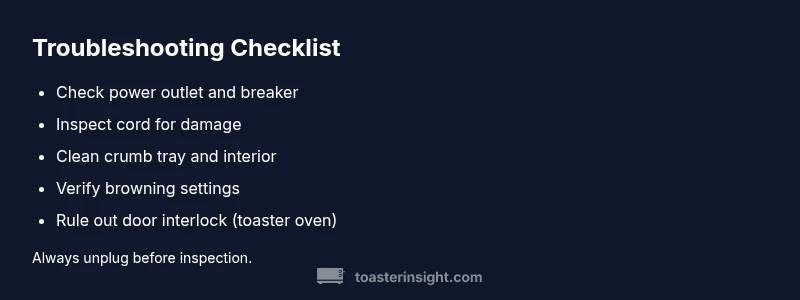
Before you tear into the housing, perform a few rapid checks: test the outlet with another device, ensure the plug is fully seated, inspect the cord for cracks or exposed wires, remove crumbs from the crumb tray, and confirm the bread rack isn’t bent or obstructing heat flow. Make sure the unit sits on a stable surface and isn’t smeared with grease or liquid. Finally, verify the browning setting, then reset the device if it has a reset option. These micro-checks catch the majority of everyday faults and keep your kitchen safe.
Distinguishing toaster vs toaster oven behavior
Toasters and toaster ovens share some components but behave differently under fault conditions. A simple two-slice toaster uses side elements that heat when power is applied and relies on a spring mechanism or electronic timer. A toaster oven combines heating elements with a chamber door, a bake/roast function, and a timer. If a toaster oven won’t heat, the door interlock or thermostat might be at fault, whereas a plain toaster might simply have a mis-set browning control. Understanding these differences helps you target the right subsystem and avoid unnecessary replacements.
Safety first: power, outlets, and cords
Working with electrical appliances demands caution. Always unplug before inspecting internal parts or removing the crumb tray. Avoid using damaged cords or outlets; never force cords through tight spaces. If you must use an extension cord, choose a heavy-duty, properly rated one and limit the load to safe levels. If you encounter scorch marks, a burning smell, or melted insulation, stop using the device and consult a professional. Safety is the priority, and many toaster issues stem from basic electrical faults rather than the appliance itself.
Cleaning and maintenance you should do now
Crumbs and debris can insulate heat or interfere with the mechanism that ejects bread. Start by unplugging the device and removing the crumb tray; empty and wash it with warm soapy water, then dry thoroughly. Wipe the interior lightly with a damp cloth, avoiding the heating elements, and let it dry completely before reassembly. Regular maintenance—crumb removal after every few uses and periodic interior cleaning—can prevent sizzling noises, inconsistent browning, and heat losses that lead to a malfunction.
Common internal failures by component
If power and settings checks don’t resolve the issue, the culprit may be one of several internal components: heating elements that have degraded over time, a thermostat that won’t regulate heat, a faulty timer, or a failing door interlock in toaster ovens. Visual inspection may reveal loose connections or burn marks, but more complex diagnostics require professional service. In many cases, replacing the unit is more economical than repairing an aging element. Always consider safety and warranty implications before attempting internal repairs.
Small tests you can perform at home (safety-conscious)
Running simple at-home tests helps you decide whether a repair is viable. Start with a different outlet and a different plug, listen for the click when the browning control engages, and observe whether any light indicators respond. If the unit remains unresponsive or smells burnt, stop and seek professional help. Never touch exposed elements or live circuits. If you can isolate a problem to a single feature, such as browning control not altering heat, you have a clearer repair path or replacement decision.
When to replace versus repair: practical decision-making
Toaster life spans vary, but many households find it cost-effective to replace an aging toaster or toaster oven rather than pursue costly internal repairs. If major components—heating elements, thermostat, or door interlock—show wear or visible damage, or if the unit is several years old and inefficient, replacement is often best. Compare the repair estimate with the cost of a new unit that offers energy efficiency and improved safety features. For older devices with frequent faults, retirement may be the simplest, safest option.
Prevention tips to keep toast trouble-free
Preventive habits matter. Clean the crumb tray weekly, wipe the interior monthly, and check the power cord for fraying. Use the correct bread thickness and avoid overfilling the chamber. Store the appliance away from water sources and heat vents to reduce thermal stress. Finally, follow manufacturer guidelines for preheating, browning levels, and reset procedures. These steps minimize downtime and extend the life of your toaster or toaster oven.
Steps
Estimated time: 30-60 minutes
- 1
Unplug and inspect power cord
Begin by unplugging the unit and checking the cord for any visible damage. Look for kinks, frays, or scorch marks. If you find damage, replace the cord or the unit. Safety tip: never use a damaged cord.
Tip: Damaged cords are a common cause of shocks or fires. - 2
Test the outlet and reset the breaker
Plug a different device into the outlet to confirm it supplies power. If not, reset the circuit breaker and wait a minute before retrying. If a reset is needed repeatedly, stop and consult an electrician.
Tip: Use a known-good outlet to rule out the circuit. - 3
Check the browning control and timers
Ensure the browning dial is set to an active heat level and the timer is functional. A mis-set dial can mimic a heat failure. If the timer doesn’t advance, the internal control may be at fault.
Tip: Start with a medium setting to test heat response. - 4
Inspect the crumb tray and interior for debris
Remove and clean the crumb tray; wipe the interior gently to remove stuck crumbs that block heat coils. Do not use water on heating elements. Dry completely before reassembly.
Tip: Let the interior dry fully to avoid short circuits. - 5
Check door interlock (toaster oven only)
Make sure the door closes fully and the interlock engages when shut. A faulty interlock prevents heating. If it clicks but does not engage, the interlock may need replacement.
Tip: Do not bypass interlocks; they’re critical for safety. - 6
Do a basic component check
Visually inspect heating elements for blistering or breaks. If you notice discoloration or burnt smells, replace the unit or have a technician inspect it.
Tip: Never test live elements with a meter without proper training. - 7
Make a replacement vs repair decision
If the unit is old or multiple components show wear, compare repair costs with a new model. Energy-efficient replacements often save money long term.
Tip: Consider warranty status before repair costs.
Diagnosis: Toaster or toaster oven won't heat or power on
Possible Causes
- highPower issue (outlet or breaker)
- highTripped circuit breaker or blown fuse
- mediumDamaged power cord or plug
- mediumDoor interlock failure (toaster oven)
- lowBurned heating element or failed thermostat
Fixes
- easyTest outlet with a known-working device; reset the breaker if needed
- easyTry a different outlet, or unplug and replug to reseat connections
- easyInspect cord for damage; replace if frayed or cracked
- mediumIf a toaster oven, verify door closes completely and interlock engages
- hardConsult a professional or consider replacement for burnt elements
Your Questions Answered
Why is toast not browning evenly?
Uneven browning can stem from inconsistent heating elements or bread thickness. Check element alignment, use uniform slices, and test with a medium setting to observe heat distribution.
Uneven browning usually comes from uneven heat or bread thickness. Check the heating elements and use uniform slices.
Is it safe to open the toaster while plugged in?
No. Always unplug first and allow the unit to cool. Inspect for damage only when unplugged.
Never open a powered toaster. Unplug and let it cool before inspecting.
What should I do if the heating element is burnt?
A burnt element indicates internal damage. Replace the unit or have a professional inspect. Do not attempt risky internal repairs.
A burnt element means you should replace the unit or call a pro.
How long should a toaster last?
Most toasters last several years with proper cleaning and gentle use. If performance declines despite maintenance, replacement may be more cost-effective.
Toasters typically last several years with proper care; consider replacement if performance drops.
Can cleaning fix all issues?
Cleaning fixes many heat delivery and timing issues caused by crumb buildup, but persistent electrical faults require professional service.
Cleaning helps a lot, but if the issue persists, call a professional.
When should I replace my toaster or toaster oven?
If repair costs approach a new unit price or there are repeated failures, replacement is often the best option for efficiency and safety.
Replace when repairs cost more than a new unit or failures recur.
Watch Video
Key Takeaways
- Check power and outlet first.
- Unplug before any internal inspection.
- Clean crumbs regularly to prevent heat blockage.
- Decide repair vs replacement based on age and cost.
- Prioritize safety and warranty guidelines.